手把手教你使用WebRTC網絡技術開發
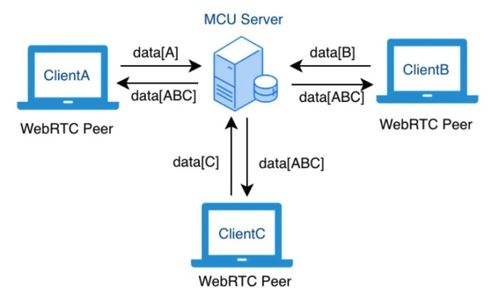
WebRTC(Web Real-Time Communication)是一項支持瀏覽器和移動應用進行實時音視頻通信的開放網絡技術。它無需安裝插件,即可實現點對點(P2P)的數據、音頻和視頻傳輸。本教程將手把手帶你入門WebRTC開發,涵蓋基本概念、核心組件和簡單實現步驟。
一、WebRTC基本概念
1. 什么是WebRTC?
WebRTC由Google發起,現已成為W3C標準。它允許Web應用直接建立端到端連接,實現低延遲的實時通信。
- 核心組件:
- getUserMedia:獲取攝像頭和麥克風等媒體設備的訪問權限。
- RTCPeerConnection:處理音頻和視頻流的P2P連接。
- RTCDataChannel:支持任意數據的P2P傳輸。
二、開發環境準備
- 支持WebRTC的瀏覽器(如Chrome、Firefox)。
- 一個簡單的Web服務器(例如使用Node.js或Python的http.server),因為WebRTC需要HTTPS或本地環境。
三、手把手實現簡單視頻通話
步驟1:獲取用戶媒體流
使用getUserMedia API請求攝像頭和麥克風權限,代碼如下:`javascript
navigator.mediaDevices.getUserMedia({ video: true, audio: true })
.then(stream => {
// 將流顯示在video元素中
const localVideo = document.getElementById('localVideo');
localVideo.srcObject = stream;
})
.catch(error => console.error('Error accessing media devices:', error));`
步驟2:建立RTCPeerConnection
創建RTCPeerConnection實例,并添加本地流:`javascript
const configuration = { iceServers: [{ urls: 'stun:stun.l.google.com:19302' }] };
const peerConnection = new RTCPeerConnection(configuration);
// 添加本地流到連接
stream.getTracks().forEach(track => peerConnection.addTrack(track, stream));
// 處理遠程流
peerConnection.ontrack = event => {
const remoteVideo = document.getElementById('remoteVideo');
remoteVideo.srcObject = event.streams[0];
};`
步驟3:信令交換
WebRTC需要信令服務器交換SDP(Session Description Protocol)和ICE(Interactive Connectivity Establishment)候選。這里以簡單WebSocket為例:
- 創建提議(offer)并設置本地描述:`javascript
peerConnection.createOffer()
.then(offer => peerConnection.setLocalDescription(offer))
.then(() => {
// 通過信令服務器發送offer
signalingServer.send(JSON.stringify({ offer: peerConnection.localDescription }));
});`
- 接收應答(answer)并設置遠程描述。
步驟4:處理ICE候選
收集并交換ICE候選以建立網絡連接:`javascript
peerConnection.onicecandidate = event => {
if (event.candidate) {
signalingServer.send(JSON.stringify({ ice: event.candidate }));
}
};`
四、進階功能
- 使用RTCDataChannel傳輸文件或消息。
- 集成TURN服務器以處理防火墻和NAT穿透問題。
- 添加錯誤處理和重連機制。
五、總結
WebRTC為實時通信提供了強大支持,通過本教程,你可以快速搭建一個基礎視頻通話應用。深入學習時,建議參考MDN Web Docs和WebRTC官方文檔,以掌握高級特性和最佳實踐。記住,實際部署時需考慮安全性和 scalability,例如使用HTTPS和可靠的信令服務。
如若轉載,請注明出處:http://www.yi-ren.com.cn/product/44.html
更新時間:2026-01-06 07:07:57